
Best Tech Gadgets for Productivity in 2026
Table of Contents
- Tech Gadgets for Productivity: What Actually Changed in 2026
- Quick Comparison: Top Productivity Gadgets at a Glance
- 1. Three-in-One Magnetic Wireless Charger: Declutter Your Desk
- 2. Sansui 24-Inch USB-C Monitor: Expand Your Screen Real Estate
- 3. In-Ear Wireless Headphones: Focus Mode for Deep Work
- The Best Ergonomic Home Office Gear for Long Workdays
- How to Organize a Home Office for Maximum Efficiency
- Productivity Tools for Remote Workers: AI and Beyond
- Frequently Asked Questions
Last Updated: September 4, 2026
Tech Gadgets for Productivity: What Actually Changed in 2026
Research on home office productivity increasingly points to rigorous testing over generic gear, with specific, high-performance tools making the measurable difference in output Wirecutter's guide to the best tech and apps for your home office. The conversation around tech gadgets for productivity 2026 has shifted away from spec sheets toward outcome-based results, and our team at Tech Sphere and More has tracked this evolution closely. One standout finding: ergonomic lighting and quality peripheral integration directly correlate with improved concentration and reduced physical fatigue in home office environments eMeet's tested home office gadget research.
The most valuable tech gadgets for productivity in 2026 solve specific friction points rather than adding more screen glow to your desk. This guide breaks down the gear that actually earns its place, the ergonomic upgrades that protect your body during long sessions, and the organizational strategies that keep your workflow moving.
Quick Comparison: Top Productivity Gadgets at a Glance
| Gadget | Price | Best For | Key Benefit |
|---|---|---|---|
| Three-in-One Magnetic Wireless Charger | $69.93 | Cable-free desks | Consolidates charging into one hub |
| Sansui 24-Inch USB-C Monitor | $97.77 | Screen real estate | Reduces eye strain, adds display space |
| In-Ear Wireless Headphones | $16.06 | Focus sessions | Bluetooth 5.4 stability for deep work |
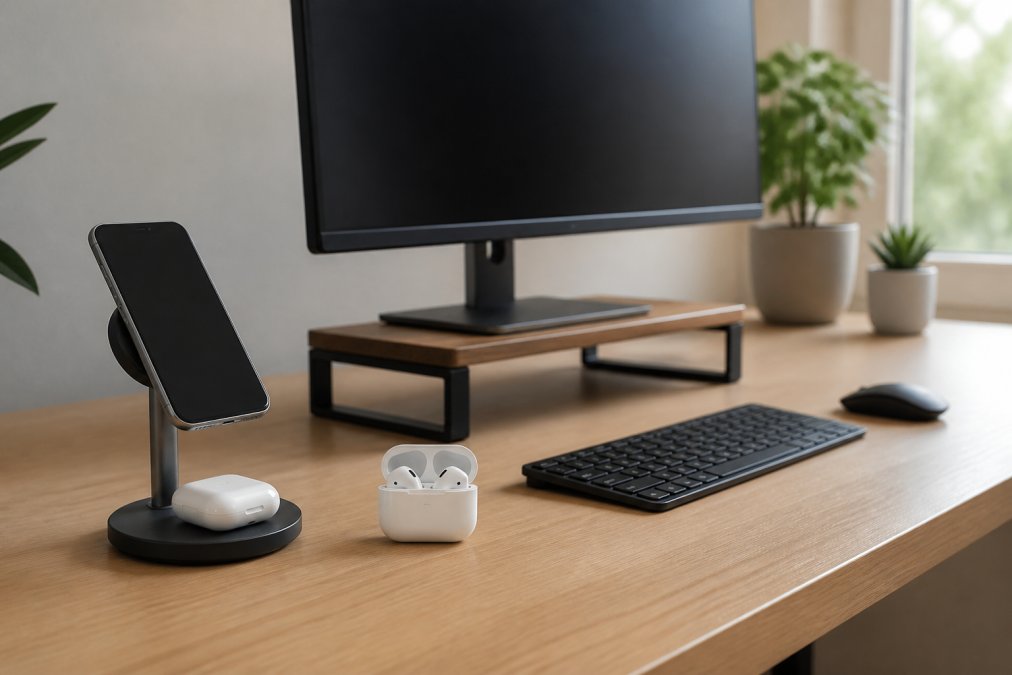
The pattern across these picks is consolidation. Each gadget removes a point of friction, whether that is a cable tangle, a cramped display, or ambient noise breaking your concentration. Multi-device ecosystems and ergonomic workstations define the current hardware landscape Unitek's analysis of 2026 tech trends.

1. Three-in-One Magnetic Wireless Charger: Declutter Your Desk
Cable management is the quiet killer of productivity, and a single charging hub solves more of it than almost any other purchase. The Three-in-One Magnetic Wireless Charger at $69.93 delivers up to 15W of power through a Type-C interface, charging your phone, earbuds, and watch from one compact station.
Available in Dark Gray, Black, or Silver, this charger replaces three separate cables and bricks with a single sleek unit. The magnetic alignment means your devices snap into place without hunting for ports, saving seconds dozens of times per day.
2. Sansui 24-Inch USB-C Monitor: Expand Your Screen Real Estate
Multiple displays can increase user productivity by 42%, according to research from Jon Peddie Research cited by eMeet (2026). The Sansui 24-Inch USB-C Monitor makes that leap affordable at $97.77, delivering Full HD 1920x1080 resolution with HDR10 support and a 75Hz refresh rate.

The anti-flicker and anti-blue light technology directly targets the measurable eye fatigue from extended sessions, with a 99.99% sRGB color gamut and 178-degree viewing angles. USB-C connectivity means a single cable carries both video and power to compatible laptops.
3. In-Ear Wireless Headphones: Focus Mode for Deep Work
The best productivity tool for remote workers is often the one that blocks the world out. These In-Ear Design Wireless Headphones for Summer, priced at $16.06, use Bluetooth 5.4 for a stable connection that will not drop during critical calls or focus sessions.
Noise-canceling audio equipment has become a cornerstone of personal productivity workflows, with some users reporting over 5 hours of reclaimed time per week through a curated ecosystem of headphones, timers, and smart assistants TechRadar's productivity tool experiment. The in-ear form factor stays comfortable during long wear, and the secure fit means they stay put whether you are at a desk or moving between rooms.
The Best Ergonomic Home Office Gear for Long Workdays
Ergonomic input devices and posture-correcting hardware are where tech gadgets for productivity 2026 separate serious setups from casual ones. The conversation has moved beyond a simple ergonomic mouse toward a holistic approach that addresses the entire kinetic chain of a workday, from your wrists to your cervical spine.
The Ergonomic Input Hierarchy: Keyboard First, Then Pointing Device
The most impactful change is your keyboard. A split, tented keyboard, like the Kinesis Advantage360 or the ZSA Voyager, forces your shoulders back and keeps your wrists in a neutral, handshake position, unlike a standard flat keyboard. Most users report a week of reduced typing speed before returning to baseline, but the payoff is a measurable reduction in forearm and wrist tension.
For a less drastic step, consider a low-profile mechanical keyboard with a gentle slope. Tactile switches like Cherry MX Brown provide a physical feedback bump that confirms a keystroke without requiring a full bottom-out, reducing impact force. Linear switches like Cherry MX Red are faster but offer no tactile confirmation, which can lead to bottoming out harder over time.
Once your keyboard is sorted, evaluate your pointing device. A vertical mouse, such as the Logitech MX Vertical, rotates your forearm so your thumb points upward, eliminating painful forearm pronation. For persistent wrist issues, a trackball like the Logitech ERGO M575 lets you control the cursor without moving your arm, isolating movement to your digits and reducing shoulder strain.
Sit-Stand Desks: The Movement Imperative
A sit-stand desk is a core component of a high-performance workspace. Prolonged static posture, whether sitting or standing, is detrimental. The value is not in standing all day, but in the transition itself: changing posture every 45 to 60 minutes re-engages core muscles, stimulates blood flow, and provides a micro-break for your eyes and brain.
The two most critical specs are the lift mechanism and weight capacity. A dual-motor system is non-negotiable for stability; single-motor desks often wobble at standing height. Look for a weight capacity of at least 250 pounds. Pair a frame like the Uplift V2 with a solid-wood or bamboo top. Memory presets let you transition with a single button press, removing the friction that keeps people in one position all day.
Lighting as a Physiological Tool
A 52% reduction in eye strain is achievable with a flicker-free LED desk lamp featuring adjustable color temperature, according to eMeet (2026). Your desk lamp is not ambient decoration; it is a productivity tool that determines how long you can work before fatigue sets in.
The mechanism is tied to your circadian rhythm. Bright, cool light (5000K-6500K) in the morning signals alertness; shifting to warmer tones (3000K-3500K) later eases the transition into evening. A lamp like the BenQ ScreenBar lets you adjust brightness and color temperature on the fly. The key is to supplement, not compete with, your monitor's backlight, reducing the contrast ratio between the bright screen and the darker room, a primary cause of eye fatigue.
How to Organize a Home Office for Maximum Efficiency
Home office organization is a cognitive load management strategy. Every visual distraction, a stray cable, a stack of papers, a blinking router light, competes for your brain's limited attentional resources. The most efficient setups minimize this 'visual noise' to protect your focus state.
The Friction Audit: A Systematic Approach
Before you buy a single cable tie, conduct a friction audit. For one workday, note every moment you break focus to search for something, untangle a cable, or adjust your posture. This reveals the specific friction points in your workflow, which is more valuable than any generic checklist.
A practical approach to organizing your workspace:
- Group charging cables by device type and route them behind your desk. Use a cable management tray or adhesive clips to keep them off the floor and out of sight. The visual absence of cables is a significant cognitive relief.
- Keep your primary display at arm's length with the top edge at eye level. This is a non-negotiable ergonomic rule, but it also has an organizational component. A monitor arm frees up desk space and allows you to position the screen precisely, eliminating the need to stack books or boxes to achieve the correct height.
- Store the Mobile Phone Screen Cleaner at $18.38 in your desk drawer for quick screen touch-ups. A clean screen is not just aesthetic; smudges and fingerprints reduce contrast and force your eyes to work harder to focus, contributing to fatigue.
- Use a Wireless Whistle for Anti-Loss and Theft Locator at $29.44 to track keys and wallet you set down during work hours. The mental overhead of 'where did I put my keys?' is a classic context switch that breaks your flow. A locator removes that anxiety entirely.
The Focus-State Gadget: A New Category for 2026
A new category is emerging that addresses the psychological aspect of productivity: focus-state gadgets. These are not timers or apps; they are hardware designed to signal your brain that it is time for deep work.

The most promising example is the 'focus light.' Unlike a standard desk lamp, it is a dedicated light source you turn on only when entering a deep work session. The act becomes a Pavlovian trigger, associating the illumination with high concentration, more effective than a software-based 'do not disturb' mode because it engages your peripheral vision and physical environment.
Another device is a 'distraction blocker', a physical switch that puts your phone into a Faraday cage or lockbox. The physical act of placing your phone out of reach is a more powerful commitment device than silencing notifications, removing the possibility of a reflexive glance.
Productivity Tools for Remote Workers: AI and Beyond
AI-integrated hardware has emerged as a defining category for 2026, with dedicated AI voice recorders and AI notetaking devices becoming essential tools SlashGear's 2026 productivity gadget roundup. The key is selectivity. Testing $800 worth of AI-integrated gadgets revealed that only a small fraction delivered measurable improvements to cognitive output, filtering out the overhyped hardware Medium's AI gadget field test.
The practical toolkit for remote workers combines focused hardware with disciplined workflow. Noise-canceling headphones handle the audio environment, a quality monitor handles the visual environment, and task management apps handle the mental environment. The Bluetooth Trucker Headset Earpiece at $63.16, with 24 hours of talk time and CVC 6.0 noise reduction, covers the communication layer for marathon call days.
The best tech gadgets for productivity are the ones you stop noticing because they work seamlessly. A clean charging station, a second display, and reliable audio create the conditions for deep work. Tech Sphere and More carries these tools and keeps the catalog fresh with new arrivals. Browse the collection and build a workspace that works as hard as you do.
Frequently Asked Questions
What are the best tech gadgets for productivity in 2026?
The most effective tech gadgets for productivity in 2026 focus on reducing friction: wireless chargers that eliminate cable clutter, monitors with USB-C connectivity for seamless multi-device setups, and noise-canceling headphones for deep work. Research from Jon Peddie Research shows multiple displays can increase productivity by 42%. Look for tools that solve a specific workflow problem rather than gadgets that add complexity. A simple setup with a 24-inch monitor, a magnetic wireless charger, and reliable earbuds covers most remote work needs.
How do desk accessories impact daily productivity?
Desk accessories directly affect how quickly you can transition between tasks. A three-in-one magnetic wireless charger, for example, keeps your phone, watch, and earbuds powered in one spot, eliminating the hunt for cables. A monitor with built-in speakers removes the need for separate audio hardware. These small efficiencies compound: TechRadar reported that a curated set of 12 essential tools helped one user reclaim 5 hours per week. The goal is fewer interruptions and less visual clutter so you can maintain focus.
What are the trending devices for 2026?
The 2026 trend is AI-integrated hardware and multi-device ecosystems. Dedicated AI voice recorders and notetaking devices are gaining traction for capturing ideas without breaking focus. High-power USB-C charging and extendable laptop monitors support complex workflows across multiple screens. SlashGear and Unitek both highlight these as essential productivity tools for the year. However, be selective: testing from Medium suggests many AI-branded gadgets are overhyped. Focus on devices that genuinely integrate with your existing workflow rather than adopting every new release.
What is the best ergonomic home office gear for reducing eye strain?
A monitor with anti-flicker and anti-blue light features is the first upgrade to make. The Sansui 24-inch USB-C monitor includes both, plus a 178-degree viewing angle that helps you maintain a neutral posture. Pair it with a desk lamp that offers adjustable color temperature. eMeet reports that flicker-free LED lighting with adjustable color temperature reduced eye strain by 52% during extended work sessions. Proper lighting and a flicker-free display work together to reduce fatigue and keep you productive longer.