
Unique Tech Gadgets for Busy Professionals in 2026
Table of Contents
- The 2026 Professional Gadget Landscape: What Actually Earns Its Place
- Quick Comparison: Top Unique Tech Gadgets for Busy Professionals
- Three-in-One Magnetic Wireless Charger: Declutter Your Power Setup
- Bluetooth Trucker Headset: Clear Calls in Any Environment
- Home Office Organization Tools: The Sansui 24-Inch Monitor
- Ergonomic Tech Gadgets: Portable Heater for Consistent Comfort
- Productivity Gadgets for Work: Small Tools, Big Impact
- How to Choose Your Next Professional Gadget
- Frequently Asked Questions
Last Updated: September 8, 2026
The market for professional gadgets in 2026 has shifted away from gimmicks toward tools that solve specific workflow problems. Curated guides now highlight wellness-integrated tech like sunrise alarm clocks and noise-canceling earbuds as essential productivity gear rather than luxury add-ons Listful's 2026 tech gadget guide. For busy professionals, the best unique tech gadgets earn their place by saving time, reducing friction, or protecting focus.
The 2026 Professional Gadget Landscape: What Actually Earns Its Place
A common mistake is treating gadget selection as a shopping spree rather than an infrastructure decision. The professionals building the most efficient home offices in 2026 are prioritizing compact, high-performance hardware that integrates cleanly with existing setups. Personal assessments of productive home environments increasingly point to devices that serve multiple functions, reducing both physical clutter and cognitive load [Michael Sliwinski's 2026 home office(/blogs/news/essential-gadgets-for-home-office) analysis | michael.team].
Quick Comparison: Top Unique Tech Gadgets for Busy Professionals
Before spending money, identify whether your bottleneck is charging logistics, communication clarity, workspace comfort, or screen real estate.
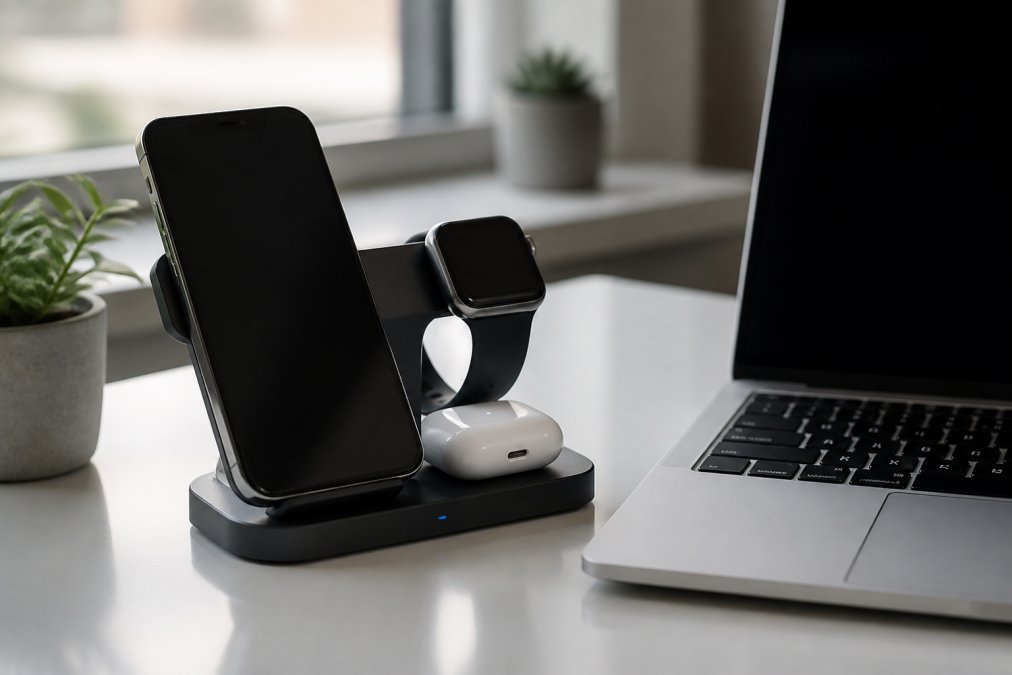
| Gadget | Price | Primary Benefit | Best For |
|---|---|---|---|
| Three-in-One Magnetic Wireless Charger | $69.93 | Consolidates device charging | Desk decluttering |
| Bluetooth Trucker Headset | $63.16 | Clear calls in noisy spaces | Remote communication |
| Sansui 24-Inch Monitor | $97.77 | Compact screen expansion | Small home offices |
| Portable Heater | $54.68 | Consistent thermal comfort | Cold home offices |
| Wireless Whistle Locator | $29.44 | Tracks essential items | Frequent travelers |
Three-in-One Magnetic Wireless Charger: Declutter Your Power Setup
The Three-in-One Magnetic Wireless Charger consolidates your phone, earbuds, and smartwatch charging into a single station, eliminating the tangle of adapters and cables around power outlets.

It delivers up to 15W of maximum output power through a Type-C interface with a 9V/2A output current, ensuring reliable performance even when several devices draw power at once.
The real value here is behavioral: a designated charging spot stops you from reaching for your phone reflexively, freeing up both physical desk space and mental bandwidth.
Bluetooth Trucker Headset: Clear Calls in Any Environment
Remote and hybrid work has made audio quality a career differentiator. The Bluetooth Trucker Headset Earpiece delivers 24 hours of talk time and 60 days of standby, with CVC 6.0 noise reduction filtering background noise (michael.team). Its lightweight design avoids the ear fatigue of heavier over-ear headsets, and it pairs with iPhones, Androids, Samsung devices, and laptops.

Home Office Organization Tools: The Sansui 24-Inch Monitor
Screen space directly correlates with productivity for knowledge workers. The Sansui 24-Inch Monitor delivers Full HD resolution at 1920x1080 with a 75Hz refresh rate, and its 250-nit brightness and anti-glare screen are designed to reduce eye strain.
USB-C and HDMI ports are both included, along with the cables, so setup takes minutes. The three-sided edgeless design maximizes usable screen area while fitting compact desks.
Ergonomic Tech Gadgets: Portable Heater for Consistent Comfort
Thermal discomfort can impact productivity. The Portable Heater delivers 500W of fan-forced warmth, quickly bringing small rooms to a comfortable working temperature. Overheat protection and a tip-over switch provide peace of mind, while quiet operation is designed not to compete with your concentration or conference calls.
The LED display and adjustable heat settings let you fine-tune your environment without getting up.
The Cognitive Load of Thermal Discomfort
When your body works to maintain core temperature, it can divert energy away from executive function. The heater can contribute to comfort by addressing thermal distractions.
A targeted 500W heater draws roughly 0.5 kWh per hour. At the national average electricity rate of about 16 cents per kWh, running it for eight hours costs approximately 64 cents per day.
Ergonomics Beyond Temperature: The Missing Categories
A complete ergonomic setup tackles several other physical distractions:
Seating posture and spinal alignment. The average professional sits for 7.7 hours per workday. A lumbar support cushion or an ergonomic chair with adjustable armrests can help prevent discomfort.
Monitor height and viewing angle. The Sansui monitor works well when its top edge sits at or slightly below eye level. A monitor stand or VESA mount arm can raise the screen to a comfortable position, which may help reduce neck strain.
Keyboard and mouse positioning. Your forearms should rest parallel to the floor with wrists in a neutral position. A compact keyboard tray or adjustable desk riser creates this alignment without requiring a full standing desk conversion.
The Psychological Case for Physical Comfort
Ergonomic upgrades can help reduce physical distractions. When your chair causes discomfort or your neck aches, your brain processes those signals in the background, which can consume working memory capacity.
A Cohesive Ergonomic Ecosystem for Deep Work
Rather than buying isolated ergonomic gadgets, professionals who protect their focus build a complete physical environment. A practical sequence for a home office setup under $200 includes:
- A targeted heating or cooling solution ($50-$70) to stabilize room temperature
- A lumbar support cushion ($25-$40) for your existing chair
- A monitor riser or VESA mount arm ($20-$60) to correct screen height
- A wrist rest or ergonomic mouse ($15-$30) to maintain neutral wrist position
Longevity and Sustainability Considerations
Ergonomic purchases are investments in your physical health, so durability matters more than with other gadget categories. The Portable Heater's straightforward design, no Wi-Fi, no companion app, no subscription, means it will function identically in five years.
Productivity Gadgets for Work: Small Tools, Big Impact
Small tools that eliminate daily friction compound into significant time savings across a workweek. The Wireless Whistle for Anti-Loss and Theft Locator helps address the recurring problem of misplaced keys, wallets, and bags.

A whistle activates the locator, making it easy to find items without digging through bags. The compact design attaches to frequently misplaced items, and the anti-theft functionality provides extra security when traveling.
The Mobile Phone Screen Cleaner combines a protective shell, washable microfiber wipe, and internal cleaning solution into a pocket-sized device. A quick spray and wipe removes smudges, keeping your screen readable during presentations and video calls.
The Metal Phone Ring Stand Holder, weighing just 11g, provides a secure grip for one-handed use and doubles as a viewing stand. These small accessories cost under $20 each but eliminate constant minor frustrations.
How to Choose Your Next Professional Gadget
Selecting the right professional gadget requires matching the tool to your specific workflow bottlenecks. Start by identifying your most frequent friction points: lost items, dead batteries, unclear calls, cramped screen space, or physical discomfort.
Consider integration with your existing tech stack. A charger that doesn't support your devices, a headset that doesn't pair with your laptop, or a monitor with the wrong ports creates new problems. Check compatibility before purchasing.
The Deep Work vs. Collaboration Framework
Most gadget guides organize recommendations by product type, ignoring how professionals actually structure their days. A more useful framework categorizes gadgets by the work mode they serve: deep work (uninterrupted, cognitively demanding tasks) and collaboration (communication, coordination, and synchronous interaction).
Deep Work Gadgets: Protecting Focus
Deep work requires minimizing interruptions and maintaining flow. The gadgets that serve this mode remove the possibility of distraction rather than relying on willpower.
- The Three-in-One Magnetic Wireless Charger serves deep work by creating a designated drop zone for your phone, so you're less likely to reach for it reflexively during focused sessions.
- The Sansui 24-Inch Monitor supports deep work by expanding your visual workspace. Research on dual-monitor setups suggests potential productivity gains for tasks requiring referencing multiple documents simultaneously.
- The Portable Heater protects deep work by eliminating thermal distraction, keeping your cognitive resources available for the task at hand.
For deep work involving writing, coding, or data analysis, the monitor is typically the highest-impact purchase. For shared spaces, noise-canceling audio becomes more critical than screen real estate.
Collaboration Gadgets: Enhancing Communication
Collaboration mode requires clear audio, reliable connectivity, and the ability to transition between contexts smoothly.
- The Bluetooth Trucker Headset is a collaboration-first tool. Its CVC 6.0 noise reduction ensures the person on the other end hears your voice clearly, and its 24-hour talk time means you never miss a client call because your headset died.
- The Wireless Whistle Locator serves collaboration indirectly by eliminating the pre-meeting friction of searching for your keys or badge.
The Integration Workflow: Building a Cohesive Ecosystem
Integrated gadget setups can be highly effective, where devices complement each other. Here's how a developer might combine these gadgets versus a project manager:
For a software developer (heavy deep work, occasional collaboration):
- Sansui monitor for code and documentation side-by-side
- Three-in-One charger to keep phone out of reach during coding sprints
- Portable heater for consistent temperature in a home office
- Bluetooth headset only for standup meetings and code reviews
For a project manager (heavy collaboration, intermittent deep work):
- Bluetooth trucker headset for back-to-back client and team calls
- Three-in-One charger to keep devices topped up between meetings
- Wireless whistle locator for finding a badge or keys when rushing between sites
- Sansui monitor for project tracking dashboards and status documents
A Decision Framework for Your Specific Role
Rather than asking "Is this gadget cool?" or even "Is this gadget useful?", ask: "Does this gadget reduce friction in my dominant work mode?"
For deep work-dominant professionals, prioritize:
- Tools that eliminate potential distractions (designated phone charging, noise isolation)
- Tools that expand cognitive capacity (additional screen space, ergonomic comfort)
- Tools that reduce transition costs between tasks
For collaboration-dominant professionals, prioritize:
- Tools that improve communication clarity (dedicated headsets, quality microphones)
- Tools that ensure availability (long battery life, reliable charging)
- Tools that reduce logistical friction (item locators, portable power)
Sustainability and Longevity as a Selection Criterion
Well-built tools that last through multiple years of daily use can be a better investment than cheaper alternatives that require more frequent replacement.
When evaluating a gadget's longevity, consider three factors:
- Repairability: Can the battery be replaced? Are cables detachable? Products with replaceable components outlast sealed units.
- Standards compliance: Does it use current connectivity standards (USB-C, Bluetooth 5.0+) that will remain compatible with future devices?
- Manufacturer commitment: Does the company have a track record of firmware updates and ongoing support?
The Bluetooth Trucker Headset's 60-day standby time and the Portable Heater's mechanical controls are examples of design features that can contribute to longevity.
The Final Filter: Does It Earn Its Desk Space?
Every gadget on your desk demands a fraction of your attention, through its presence, its cables, its charging requirements, or its maintenance. Before purchasing, mentally walk through a typical workday and identify where the gadget would intervene. If you can't identify a specific moment when it eliminates friction, it may not be the right fit.
Professionals who build effective tech setups often focus on selecting the right tools. A curated ecosystem of tools that serve your workflow can be more effective than a desk covered in many gadgets that don't address specific needs.
Choosing the right unique tech gadgets for busy professionals comes down to identifying your specific friction points and matching tools to those needs. The products we've covered each address distinct challenges that can impact productivity. Tech Sphere and More offers these gadgets alongside a growing catalog of tech and pet products, with new additions arriving regularly. Browse the collection and find tools that can help with your daily distractions.
Frequently Asked Questions
What is the coolest tech gadget for a busy professional?
The coolest tech gadgets for busy professionals are those that solve a specific time or focus problem. A three-in-one magnetic wireless charger ($69.93) is a top pick because it powers your phone, watch, and earbuds from one compact station, eliminating cable clutter. For communication, a Bluetooth trucker headset with CVC 6.0 noise reduction keeps calls clear in noisy environments. The best gadget is one you actually use daily to simplify your workflow.
What are the best tech gadgets to increase productivity for professionals?
The best productivity gadgets for work target focus and efficiency. A 24-inch Sansui monitor with USB-C connectivity offers a larger canvas for multitasking and features an anti-glare screen designed to reduce eye strain, making it a valuable home office organization tool. For quick cleaning, an all-in-one screen cleaner keeps your devices smudge-free. These tools reduce friction in your daily routine, allowing you to maintain deep work states without interruption.
What are some unique desk accessories that actually improve workflow?
Unique desk accessories that improve workflow focus on ergonomics and organization. A portable 500W heater with quiet operation can help maintain a comfortable temperature, which may contribute to better focus. A metal phone ring stand provides a secure grip and acts as a hands-free stand for video calls. These ergonomic tech gadgets and organization tools minimize physical discomfort and device mishandling, which are common distractions during a busy workday.
How can I keep my tech gadgets organized in a small home office?
Consolidation is key for home office organization. A three-in-one magnetic wireless charger combines multiple cables into one device, saving valuable desk space. A monitor with built-in speakers and USB-C connectivity reduces the need for separate peripherals and cables. These choices simplify your tech stack, making your workspace easier to manage and clean.